🛠 agent-toolclaude-codecodex
163K
skills
Skills for Real Engineers. Straight from my .claude directory.
Mmattpocock3 months ago
npx skills@latest add mattpocock/skillsSkills for Real Engineers. Straight from my .claude directory.
npx skills@latest add mattpocock/skillsLangflow is a powerful tool for building and deploying AI-powered agents and workflows.
Claude Code is an agentic coding tool that lives in your terminal, understands your codebase, and helps you code faster by executing routine tasks, explaining complex code, and handling git workflows - all through natural language commands.
Claude Code is an agentic coding tool that lives in your terminal, understands your codebase, and helps you code faster by executing routine tasks, explaining complex code, and handling git workflows -- all through natural language commands. Use it in your terminal, IDE, or tag @claude on Github.

**Learn more in the [official documentation](https://code.claude.com/docs/en/overview)**.

<img src="./demo.gif" />

## Get started
> [!NOTE]
> Installation via npm is deprecated. Use one of the recommended methods below.

For more installation options, uninstall steps, and troubleshooting, see the [setup documentation](https://code.claude.com/docs/en/setup).

1. Install Claude Code:

**MacOS/Linux (Recommended):**The platform follows an agentic framework with specialized nodes that process data sequentially:
Research Nodes:
CompanyAnalyzer: Researches core business informationIndustryAnalyzer: Analyzes market position and trendsFinancialAnalyst: Gathers financial metrics and performance dataNewsScanner: Collects recent news and developmentsProcessing Nodes:
Collector: Aggregates research data from all analyzersCurator: Implements content filtering and relevance scoringBriefing: Generates category-specific summaries using Gemini 2.5 FlashEditor: Compiles and formats the briefings into a final report using GPT-5.1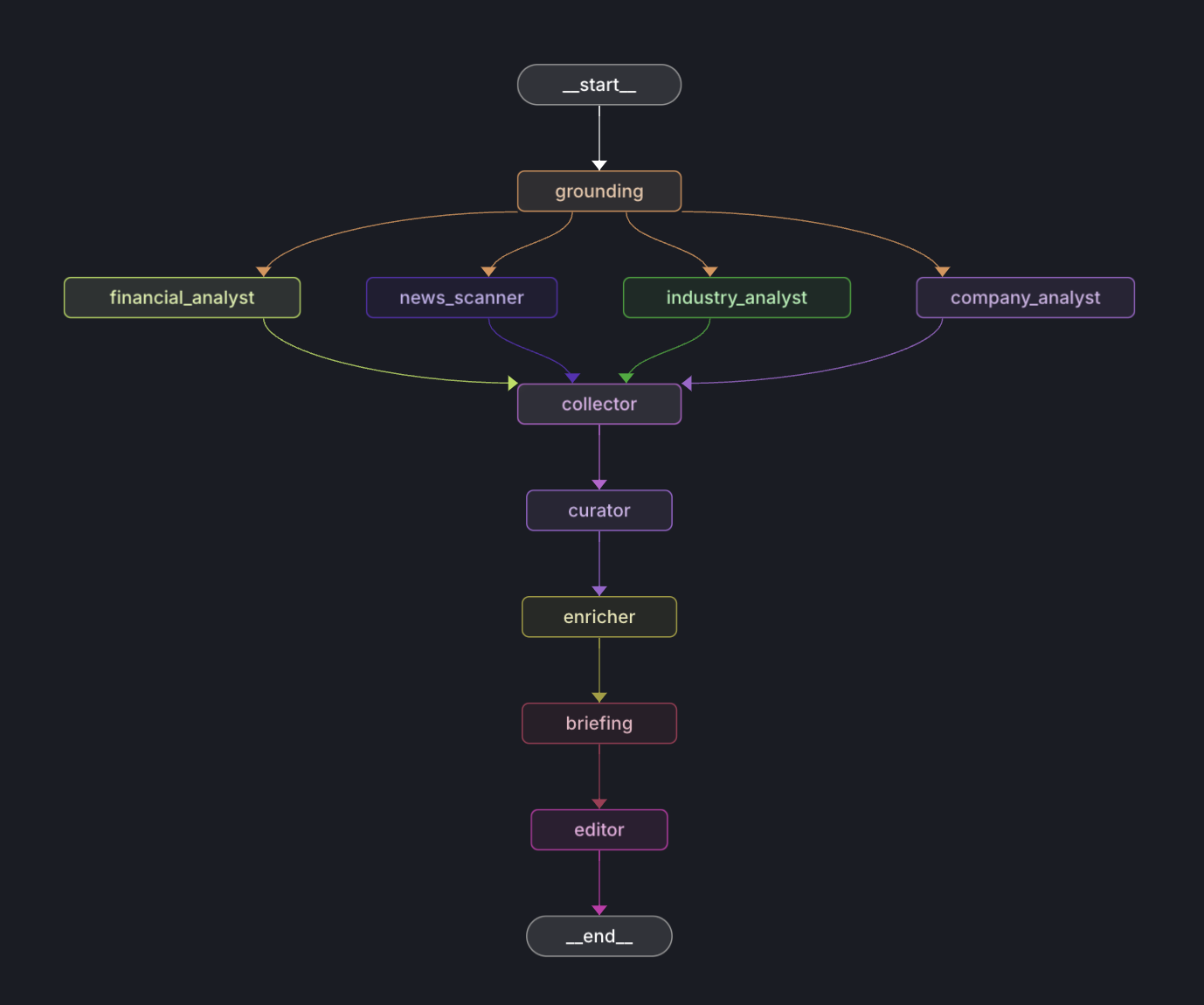
The platform leverages separate models for optimal performance:
Gemini 2.5 Flash (briefing.py):
GPT-5.1 (editor.py):
1641 GitHub stars recorded
Start the backend server (choose one option):
Option 1: Direct Python Module
python -m application.py
Option 2: FastAPI with Uvicorn
# Install uvicorn if not already installed
# With uv (faster):
uv pip install uvicorn
# Or with pip:
# pip install uvicorn
# Run the FastAPI application with hot reload
uvicorn application:app --reload --port 8000
The backend will be available at:
http://localhost:8000Start the frontend development server:
cd ui
npm run dev
Access the application at http://localhost:5173
⚡ Performance Note: If you used
uvduring setup, you'll benefit from significantly faster package installation and dependency resolution.uvis a modern Python package manager written in Rust that can be 10-100x faster than pip.
The application can be deployed to various cloud platforms. Here are some common options:
Choose the platform that best suits your needs. The application is platform-agnostic and can be hosted anywhere that supports Python web applications.
This approach combines Gemini's strength in handling large context windows with GPT-5.1's precision in following specific formatting instructions.
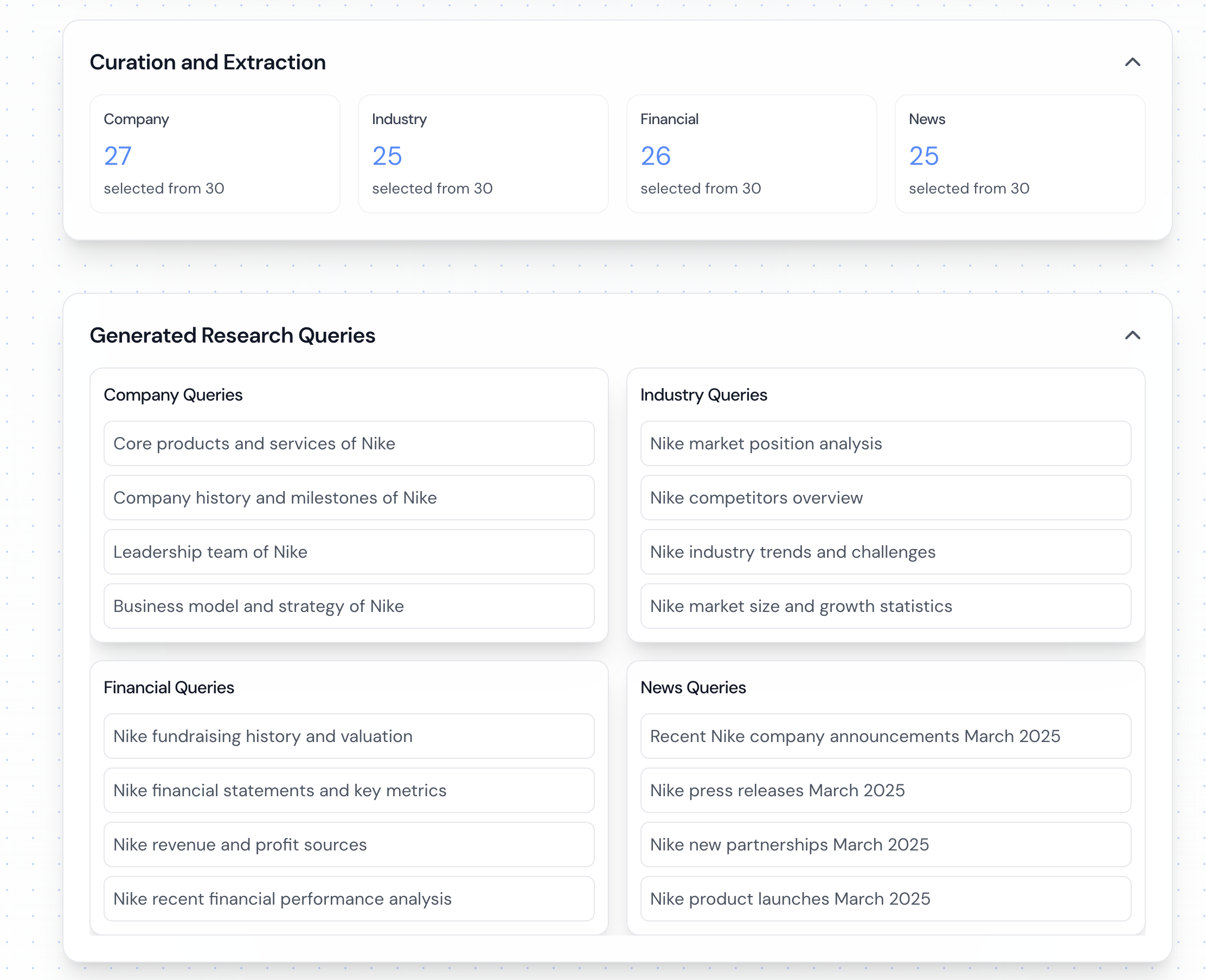
The platform uses a content filtering system in curator.py:
Relevance Scoring:
Document Processing:
The platform implements a simple polling-based communication system:
Backend Implementation:
Frontend Integration:
/research/{job_id}/report endpointAPI Endpoints:
POST /research: Submit new research requestGET /research/{job_id}/report: Poll for completed reportPOST /generate-pdf: Generate PDF from report content# Optional: Create and activate virtual environment
# With uv (faster - recommended if available):
uv venv .venv
source .venv/bin/activate
# Or with standard Python:
# python -m venv .venv
# source .venv/bin/activate
# Install Python dependencies
# With uv (faster):
uv pip install -r requirements.txt
# Or with pip:
# pip install -r requirements.txt
cd ui
npm install
This project requires two separate .env files for the backend and frontend.
For the Backend:
Create a .env file in the project's root directory and add your backend API keys:
TAVILY_API_KEY=your_tavily_key
GEMINI_API_KEY=your_gemini_key
OPENAI_API_KEY=your_openai_key
# Optional: Enable MongoDB persistence
# MONGODB_URI=your_mongodb_connection_string
For the Frontend:
Create a .env file inside the ui directory. You can copy the example file first:
cp ui/.env.development.example ui/.env
Then, open ui/.env and add your frontend environment variables:
VITE_API_URL=http://localhost:8000
VITE_GOOGLE_MAPS_API_KEY=your_google_maps_api_key_here
The application can be run using Docker and Docker Compose:
git clone https://github.com/guy-hartstein/company-research-agent.git
cd company-research-agent
The Docker setup uses two separate .env files.
For the Backend:
Create a .env file in the project's root directory with your backend API keys:
TAVILY_API_KEY=your_tavily_key
GEMINI_API_KEY=your_gemini_key
OPENAI_API_KEY=your_openai_key
# Optional: Enable MongoDB persistence
# MONGODB_URI=your_mongodb_connection_string
For the Frontend:
Create a .env file inside the ui directory. You can copy the example file first:
cp ui/.env.development.example ui/.env
Then, open ui/.env and add your frontend environment variables:
VITE_API_URL=http://localhost:8000
VITE_GOOGLE_MAPS_API_KEY=your_google_maps_api_key_here
docker compose up --build
This will start both the backend and frontend services:
http://localhost:8000http://localhost:5174To stop the services:
docker compose down
Note: When updating environment variables in .env, you'll need to restart the containers:
docker compose down && docker compose up
# Option 1: Direct Python Module
python -m application.py
# Option 2: FastAPI with Uvicorn
uvicorn application:app --reload --port 8000
cd ui
npm run dev
http://localhost:5173