🛠 agent-toolclaude-codecodex
163K
skills
Skills for Real Engineers. Straight from my .claude directory.
Mmattpocock3 months ago
npx skills@latest add mattpocock/skillsSkills for Real Engineers. Straight from my .claude directory.
npx skills@latest add mattpocock/skillsLangflow is a powerful tool for building and deploying AI-powered agents and workflows.
Claude Code is an agentic coding tool that lives in your terminal, understands your codebase, and helps you code faster by executing routine tasks, explaining complex code, and handling git workflows - all through natural language commands.
Claude Code is an agentic coding tool that lives in your terminal, understands your codebase, and helps you code faster by executing routine tasks, explaining complex code, and handling git workflows -- all through natural language commands. Use it in your terminal, IDE, or tag @claude on Github.

**Learn more in the [official documentation](https://code.claude.com/docs/en/overview)**.

<img src="./demo.gif" />

## Get started
> [!NOTE]
> Installation via npm is deprecated. Use one of the recommended methods below.

For more installation options, uninstall steps, and troubleshooting, see the [setup documentation](https://code.claude.com/docs/en/setup).

1. Install Claude Code:

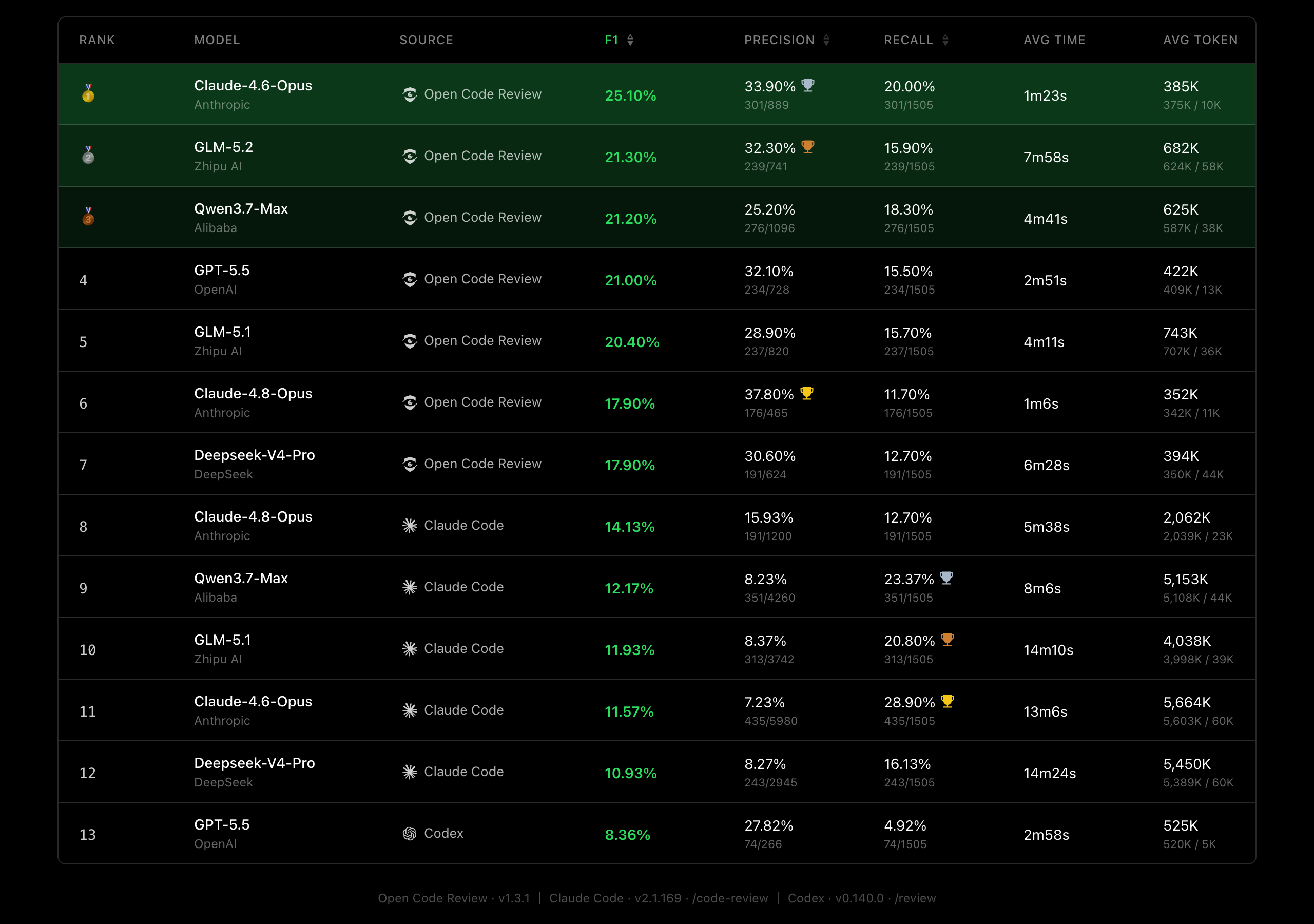
**MacOS/Linux (Recommended):**Compared to general-purpose agents (Claude Code), Open Code Review achieves significantly higher Precision and F1 with the same underlying model, while consuming only ~1/9 of the tokens and completing reviews faster. Note that its Recall is lower than general-purpose agents — a deliberate trade-off favoring precision over noise.
A real-world code review benchmark built from 50 popular open-source repositories, 200 real Pull Requests, and 10 programming languages — cross-validated by 80+ senior engineers (1,505 annotated ground-truth issues).
| Metric | What it measures | Why it matters |
|---|---|---|
| F1 | Harmonic mean of precision and recall | Best single number for overall review quality |
| Precision | Proportion of reported issues that are real defects | Higher = fewer false alarms to triage |
| Recall | Proportion of real defects that are found | Higher = fewer issues slip through review |
| Avg Time | Wall-clock time per review | Matters for CI pipeline latency |
| Avg Token | Total tokens consumed per review | Directly impacts API cost |
Carries strong trust indicators from repository metadata
10269 GitHub stars recorded
# Interactive provider and model setup
ocr config provider
ocr config model
ocr llm providers

# Delete a custom provider
ocr config unset custom_providers.my-gateway

# Preview which files will be reviewed (no LLM calls)
ocr review --preview
ocr review -c abc123 -p

# Review workspace changes with default settings
ocr review

# Review branch diff with higher concurrency
ocr review --from main --to my-feature --concurrency 4

# Review a specific commit with verbose JSON output
ocr review --commit abc123 --format json --audience agent

# Resume an interrupted range or commit review
ocr session list
ocr session show <session-id>
ocr review --from main --to my-feature --resume <session-id>
ocr review --commit abc123 --resume <session-id>

# Select or override model for this review
ocr review --model claude-opus-4-6
ocr review --commit abc123 --model claude-sonnet-4-6

# Provide requirement context for more targeted review
ocr review --background "Adding rate limiting to the login API"

# Provide requirement context from a Markdown file
ocr review --background-file ./docs/my_business_context.md

# Combine inline context with a local context file (both are used)
ocr review --background "Focus on auth" --background-file ./docs/my_business_context.md

# Use custom review rules
ocr review --rule /path/to/my-rules.json

# Preview which rule applies to a file
ocr rules check src/main/java/com/example/Foo.java
ocr rules check --rule custom.json src/main/resources/mapper/UserMapper.xml

# Full-file scan: preview the file list first (no LLM calls)
ocr scan --preview

# Scan the whole repo, cap spend at ~500k tokens
ocr scan --max-tokens-budget 500000

# Scan a subdirectory, skipping generated/test files
ocr scan --path internal --exclude '**/*_test.go,**/generated/**'

# Scan a non-git directory with JSON output (includes project_summary)
ocr scan --repo /path/to/plain/dir --format json

# Fastest scan: skip planning, dedup, and the project summary
ocr scan --no-plan --no-dedup --no-summary

# View review session history in browser
ocr viewer
ocr viewer --addr :3000
The viewer serves session JSONL contents (LLM request messages and responses) over HTTP. It enforces a Host-header allowlist on every request: loopback names (localhost, 127.0.0.0/8, ::1) and the concrete bind host are always allowed. Wildcard binds (--addr :3000, --addr 0.0.0.0:3000) and other non-loopback Hostnames must be added via the OCR_VIEWER_ALLOWED_HOSTS environment variable (comma-separated):
OCR_VIEWER_ALLOWED_HOSTS=review.internal,ocr.lan ocr viewer --addr :3000
This blocks DNS-rebinding attacks against the local viewer.
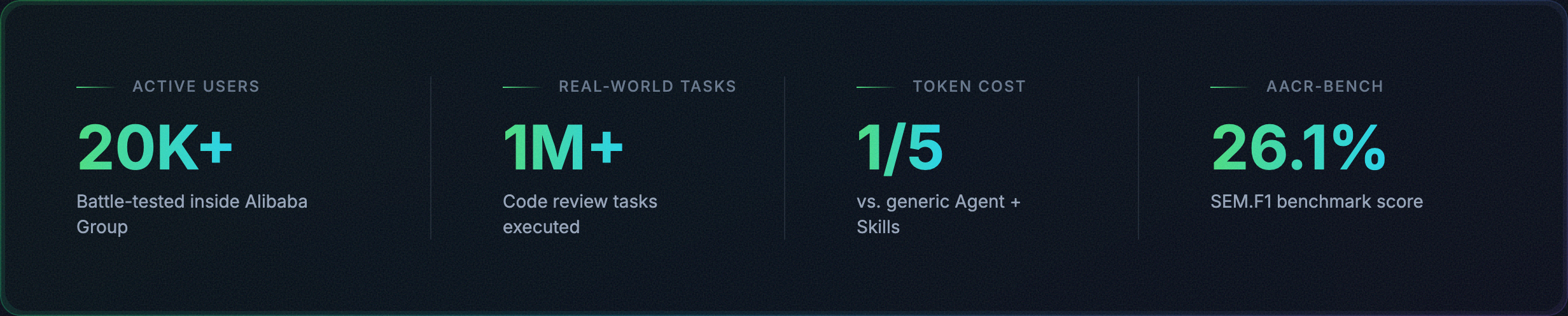
Open Code Review is an AI-powered code review CLI tool. It originated as Alibaba Group's internal official AI code review assistant — over the past two years, it has served tens of thousands of developers and identified millions of code defects. After thorough validation at massive scale, we incubated it into an open source project for the community. Simply configure a model endpoint to get started.
It reads Git diffs, sends changed files to a configurable LLM via an agent with tool-use capabilities, and generates structured review comments with line-level precision. The agent can read full file contents, search the codebase, inspect other changed files for context, and produce deep reviews — not just surface-level diff feedback. Beyond diff review, ocr scan reviews entire files for auditing unfamiliar codebases or directories that have no meaningful diff.
Visit the official website for more details.
| Inspect one session and its per-file checkpoints |
ocr viewer | ocr v | Launch WebUI session viewer on localhost:5483 |
ocr version | — | Show version info |
ocr review Flags| Flag | Shorthand | Default | Description |
|---|---|---|---|
--repo | — | current dir | Git repository root |
--from | — | — | Source ref (e.g., main) |
--to | — | — | Target ref (e.g., feature-branch) |
--commit | -c | — | Single commit to review |
--exclude | — | — | Comma-separated gitignore-style patterns to skip; merged with rule.json excludes |
--preview | -p | false | Preview which files will be reviewed without running the LLM |
--resume | — | — | Resume from a previous compatible range or commit review session |
--format | -f | text | Output format: text or json |
--concurrency | — | 8 | Max concurrent file reviews |
--timeout | — | 10 | Concurrent task timeout in minutes |
--audience | — | human | human (show progress) or agent (summary only) |
--background | -b | — | Optional requirement/business context for the review; auto-filled from commit message when using --commit |
--background-file | -B | — | Optional requirement/business context from a Markdown file; Combined with --background the inline value is given first |
--model | — | — | Select or override the LLM model for this review |
--rule | — | — | Path to custom JSON review rules |
--max-tools | — | built-in | Max tool call rounds per file; only takes effect when greater than template default |
--max-git-procs | — | 16 | Max concurrent git subprocesses |
--tools | — | built-in | Path to custom JSON tools config |
Every ocr review run persists a local session log under
~/.opencodereview/sessions/. Successful text output stays focused on review
results and does not print the session ID; use ocr session list/show to find
saved sessions, or --format json to include session_id in machine-readable
output. If a range or commit review is interrupted, list the saved sessions and
resume from the one that matches the same review target:
ocr session list
ocr session show <session-id>
ocr review --from main --to feature-branch --resume <session-id>
ocr review --commit abc123 --resume <session-id>
Resume is intentionally strict: it only supports branch-range and single-commit
reviews, not workspace reviews, and the current --from/--to or --commit
must match the saved session. --preview cannot be combined with --resume.
When --format json is used, resumed runs include:
session_id — the current run's session IDresume.resumed_from — the source session IDresume.reused_files — files reused from saved checkpointsresume.rerun_files — files reviewed again in the current runocr session Flags| Command | Flag | Default | Description |
|---|---|---|---|
ocr session list | --repo | current dir | Repository whose sessions should be listed |
ocr session list | --json | false | Emit session summaries as JSON |
ocr session list | --limit | 20 | Cap listed sessions; use 0 for unlimited |
ocr session show <id> | --repo | current dir | Repository whose session should be inspected |
ocr session show <id> | --json | false | Emit session metadata and per-file items as JSON |
ocr scan Flagsocr scan reviews entire files rather than a diff — useful for auditing an unfamiliar
codebase, a pre-migration sweep, or any directory with no meaningful diff. It works in
non-git directories too (it falls back to a filesystem walk that honors .gitignore).
| Flag | Shorthand | Default | Description |
|---|---|---|---|
--path | — | whole repo | Comma-separated dirs/files to scan |
--exclude | — | — | Comma-separated gitignore-style patterns to skip; merged with rule.json excludes |
--preview | -p | false | List which files would be scanned without running the LLM |
--max-tokens-budget | — | 0 (unlimited) | Cap total token usage; dispatch stops once exceeded |
--no-plan | — | false | Skip the per-file planning pre-pass |
--no-dedup | — | false | Skip per-batch de-duplication of similar comments |
--no-summary | — | false | Skip the project-level summary |
--batch | — | by-language | Batching strategy: none, by-language, or by-directory |
--format | -f | text | Output format: text or json (JSON includes a project_summary field) |
--concurrency | — | 8 | Max concurrent file scans |
--rule | — | — | Path to custom JSON review rules |
--repo | — | current dir | Repository or directory root to scan |
Before each run, ocr scan prints a rough token-cost estimate. Use --preview to see the
file list first, and --max-tokens-budget to cap spend on large repositories.